> ## Documentation Index
> Fetch the complete documentation index at: https://docs.sweetspotgov.com/llms.txt
> Use this file to discover all available pages before exploring further.
# Proposal Engine
> Outline, draft, and edit your proposal with AI grounded in your Library
The Proposal Engine takes a solicitation from upload to draft: Sweetspot builds a compliance-mapped outline from the RFP, writes the draft section by section from your organization's Library, and hands it off to a Word-like editor, so there's no new writing interface to learn.
## RFP Response
### The draft outline
Start from the **Proposal Documents** tab of a pursuit:
Sweetspot analyzes the solicitation (Sections C, L, and M) to build the outline.
Pick the pursuit files and Library files the draft should be based on, and add custom instructions if you have them. Then click **Generate Draft**.
Sweetspot produces a compliance-mapped outline. Each passage has a content plan: what the passage should be about, what it should look like, and the specific content Sweetspot AI should reference.
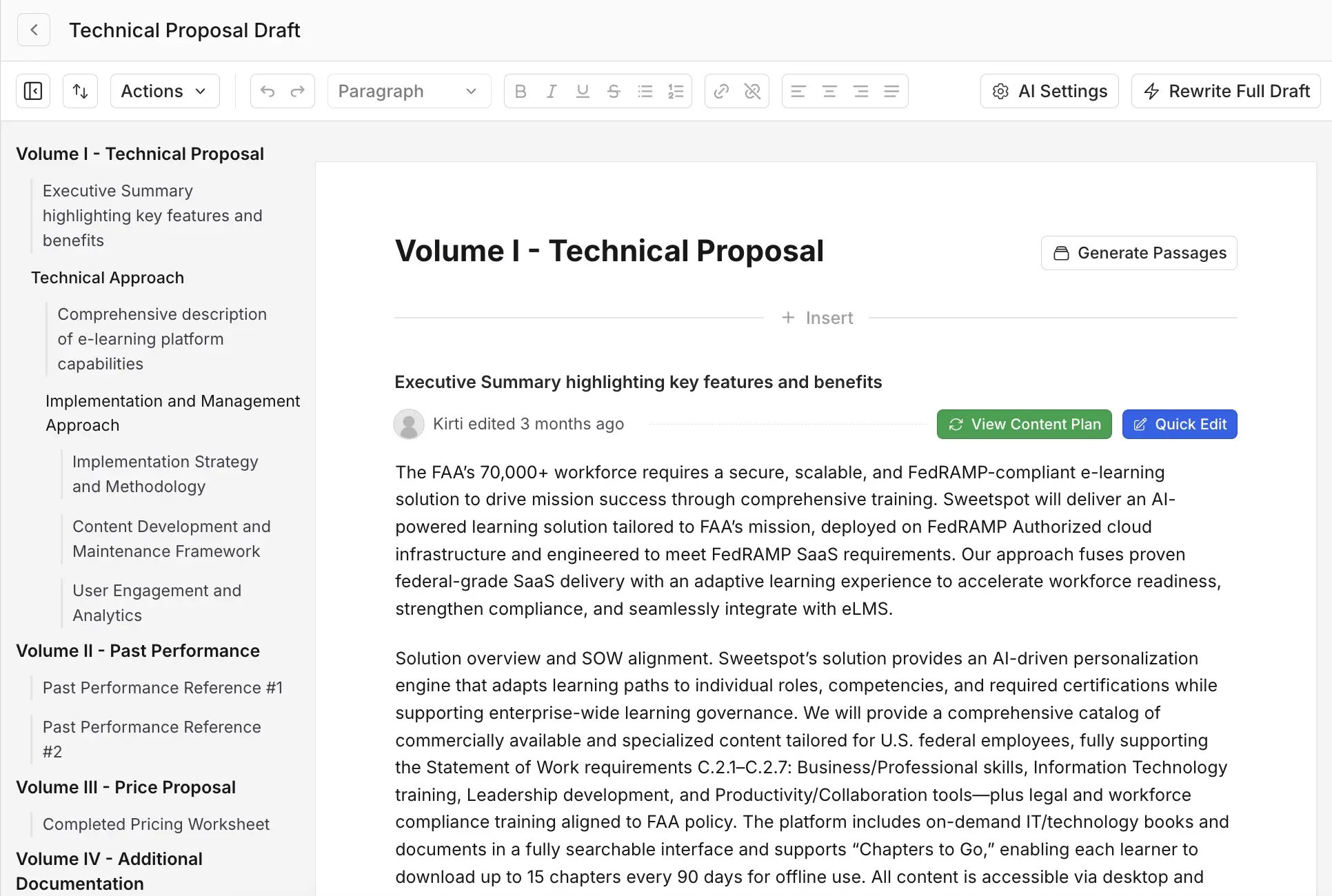 Work the outline before drafting: edit a passage's instructions, regenerate it, or restructure sections until the plan matches how you want to respond. This is the highest-leverage review point, since every downstream word follows the plan.
### Write the full draft
Once the outline looks right, click **Write Full Draft For Me** at the top, optionally with instructions for the draft (the more detailed, the better). Sweetspot writes a new document from the outline, pulling from your Library so content uses your actual past performance, with citations back to the solicitation documents.
When the draft is ready, click **Move to Sweetspot Editor** to open it as a proposal document.
Work the outline before drafting: edit a passage's instructions, regenerate it, or restructure sections until the plan matches how you want to respond. This is the highest-leverage review point, since every downstream word follows the plan.
### Write the full draft
Once the outline looks right, click **Write Full Draft For Me** at the top, optionally with instructions for the draft (the more detailed, the better). Sweetspot writes a new document from the outline, pulling from your Library so content uses your actual past performance, with citations back to the solicitation documents.
When the draft is ready, click **Move to Sweetspot Editor** to open it as a proposal document.
 ### The editor
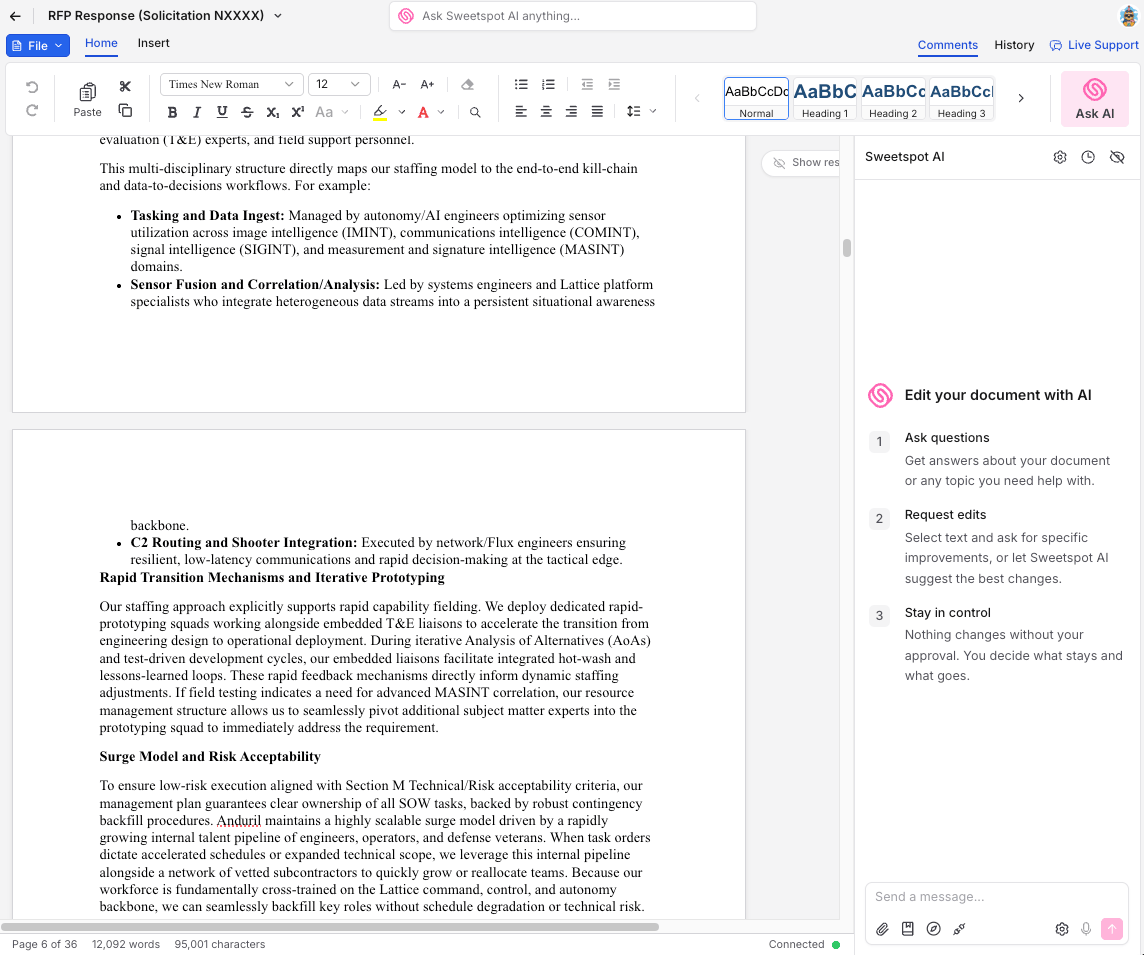
The editor works like Word: a formatting ribbon, comments, tables, search and replace, and version history. The **Sweetspot AI panel** on the right answers questions about the document and makes edits for you. Select text first to point the AI at a specific passage, or just describe the change you want anywhere in the draft.
### The editor
The editor works like Word: a formatting ribbon, comments, tables, search and replace, and version history. The **Sweetspot AI panel** on the right answers questions about the document and makes edits for you. Select text first to point the AI at a specific passage, or just describe the change you want anywhere in the draft.
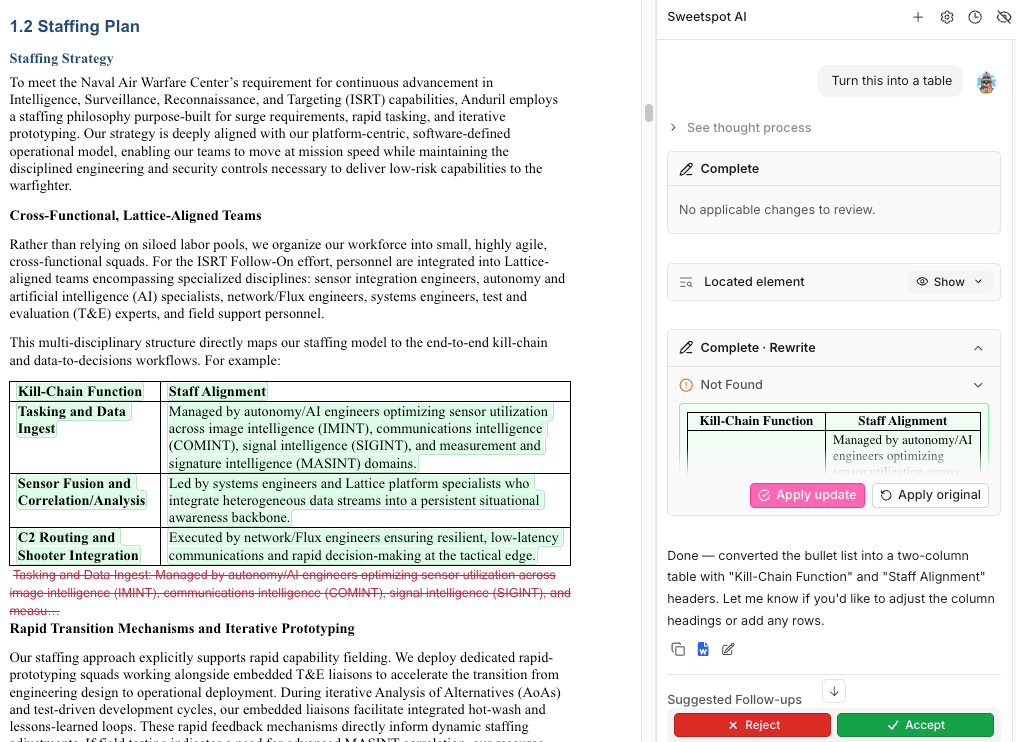 Highlight any text and tell Sweetspot AI what you want done with it, for example:
* "Make this paragraph more concise."
* "Reference my \[XYZ] past performance more here."
* "Turn this list into a table."
* "Define every acronym on first use in this section."
* "Rewrite this to speak directly to the Section M evaluation criteria."
Every edit comes back as a suggested change you **Accept** or **Reject**, so nothing changes in the document without your approval.
### Review and export
Run AI proposal review to catch compliance issues before your color team does, and use **Review Proposal** in the [Requirements tab](/pursuits/workspace#requirements) to check the draft against every requirement.
To export, go to **File → Export to Word**, or choose **Export with Word Template** if you have a [Word Template](/library/organization-library) in your Library: your branding, headers and footers, and table of contents are applied automatically.
## RFI Response
RFI and sources sought responses are how you get in front of an agency before the RFP exists: they shape the requirements, signal your capability, and often determine who's considered when the solicitation drops. They're shorter than RFPs and come in volume, so speed matters. Sweetspot gives you two routes.
### Route 1: the same flow as an RFP
Use **Proposal Documents** exactly as you would for a full proposal: create an Automatic Proposal Draft from the RFI's files, then review the outline, write the draft, and export.
Choose this route when the RFI is very long or when several people are contributing sections.
### Route 2: draft it in chat with Ask AI
For most RFIs, the faster route is the pursuit's **Ask AI** tab:
Ask the AI to "Start a draft RFI for this opportunity."
The AI asks questions to get your context: which capabilities to emphasize, relevant past performance, whether you're responding as a prime or sub, and anything else the response needs.
It writes an RFI outline first, then drafts the full response, all in chat, grounded in the RFI documents and your Library. Ask for changes the same way you'd edit any chat response: "shorten section 2", "add our \[XYZ] past performance."
Highlight any text and tell Sweetspot AI what you want done with it, for example:
* "Make this paragraph more concise."
* "Reference my \[XYZ] past performance more here."
* "Turn this list into a table."
* "Define every acronym on first use in this section."
* "Rewrite this to speak directly to the Section M evaluation criteria."
Every edit comes back as a suggested change you **Accept** or **Reject**, so nothing changes in the document without your approval.
### Review and export
Run AI proposal review to catch compliance issues before your color team does, and use **Review Proposal** in the [Requirements tab](/pursuits/workspace#requirements) to check the draft against every requirement.
To export, go to **File → Export to Word**, or choose **Export with Word Template** if you have a [Word Template](/library/organization-library) in your Library: your branding, headers and footers, and table of contents are applied automatically.
## RFI Response
RFI and sources sought responses are how you get in front of an agency before the RFP exists: they shape the requirements, signal your capability, and often determine who's considered when the solicitation drops. They're shorter than RFPs and come in volume, so speed matters. Sweetspot gives you two routes.
### Route 1: the same flow as an RFP
Use **Proposal Documents** exactly as you would for a full proposal: create an Automatic Proposal Draft from the RFI's files, then review the outline, write the draft, and export.
Choose this route when the RFI is very long or when several people are contributing sections.
### Route 2: draft it in chat with Ask AI
For most RFIs, the faster route is the pursuit's **Ask AI** tab:
Ask the AI to "Start a draft RFI for this opportunity."
The AI asks questions to get your context: which capabilities to emphasize, relevant past performance, whether you're responding as a prime or sub, and anything else the response needs.
It writes an RFI outline first, then drafts the full response, all in chat, grounded in the RFI documents and your Library. Ask for changes the same way you'd edit any chat response: "shorten section 2", "add our \[XYZ] past performance."
 Use the icons under the finished response.
* **Create Proposal Document** turns the response into a proposal document, so you can polish it in the editor like a long RFP, with tracked AI edits and Word export.
* **Export to Word** downloads it directly when the response is ready as is.
Sources sought responses follow the same pattern: ask Ask AI to draft the capability statement response, and it pulls your certifications, set-asides, and past performance from your Library and company profile.
Drafts are built from your [Organization Library](/library/organization-library), so keep past proposals, excerpts, and key personnel current. See the [Prompting Guide](/prompting-guide) for pointing the AI at the right folders and files.
Use the icons under the finished response.
* **Create Proposal Document** turns the response into a proposal document, so you can polish it in the editor like a long RFP, with tracked AI edits and Word export.
* **Export to Word** downloads it directly when the response is ready as is.
Sources sought responses follow the same pattern: ask Ask AI to draft the capability statement response, and it pulls your certifications, set-asides, and past performance from your Library and company profile.
Drafts are built from your [Organization Library](/library/organization-library), so keep past proposals, excerpts, and key personnel current. See the [Prompting Guide](/prompting-guide) for pointing the AI at the right folders and files.