> ## Documentation Index
> Fetch the complete documentation index at: https://docs.sweetspotgov.com/llms.txt
> Use this file to discover all available pages before exploring further.
# Ask AI
> Chat with any solicitation, pursuit, or your whole organization. Answers come with citations.
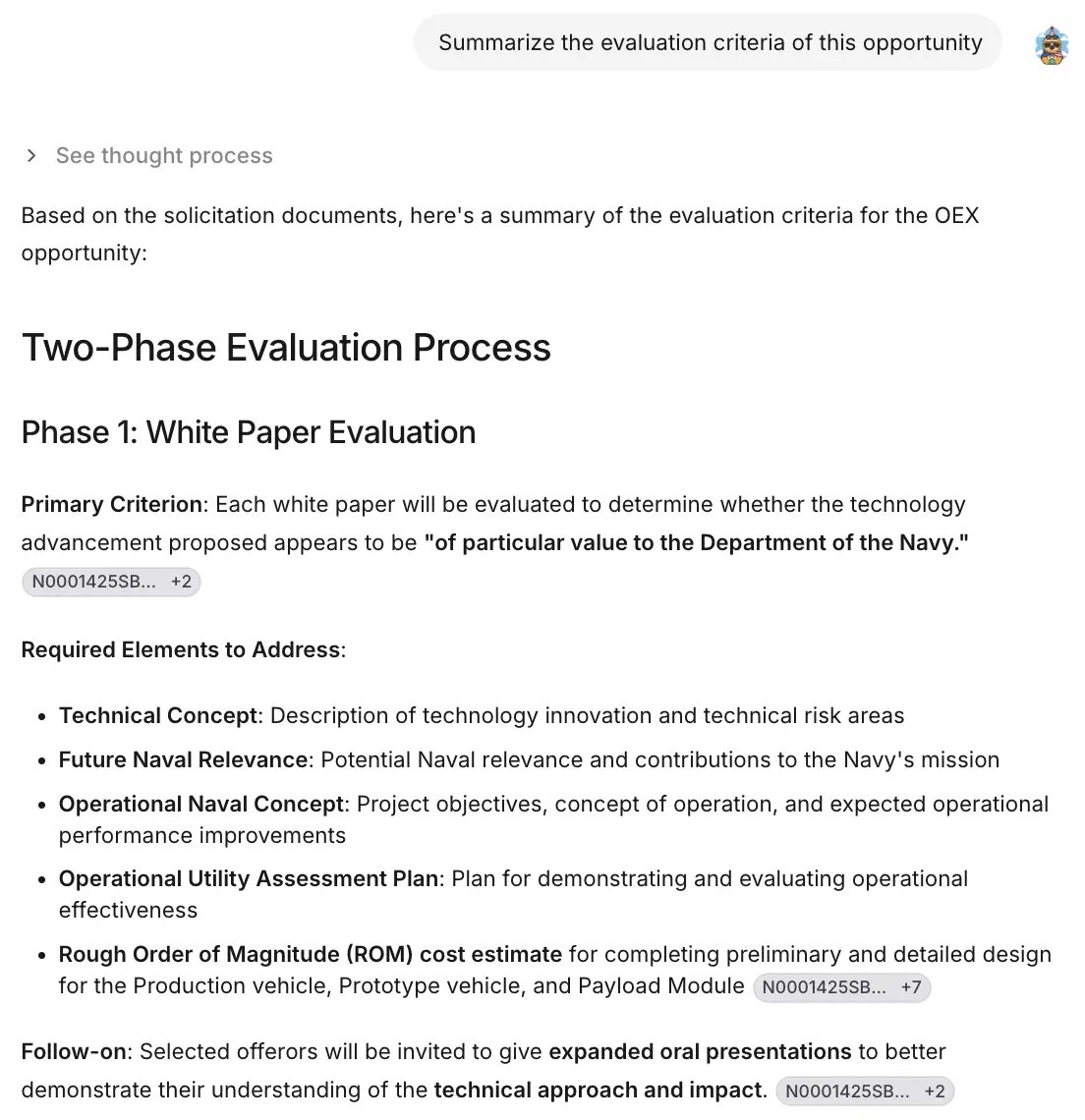 Ask AI is Sweetspot's assistant. It reads solicitations, searches your Library and pursuit files, queries federal spending data, and browses the web, then answers with citations to its sources.
## Where you can chat
Ask AI runs in three contexts, and the context determines what the AI can see:
| Context | What the AI works with |
| ---------------- | --------------------------------------------------------------------------- |
| **Organization** | Your Library, company profile, and all of Sweetspot's data sources |
| **Opportunity** | A specific solicitation and its documents, plus organization context |
| **Pursuit** | Everything in the pursuit workspace: files, notes, requirements, and drafts |
Start an organization chat from **Ask AI** in the sidebar, or open a chat from any opportunity or pursuit.
Chats are stored where you start them. A chat started inside a pursuit has all the context from that pursuit's files, and it lives in the pursuit's Ask AI tab: it won't appear in the sidebar's Ask AI chat list.
## The chat workspace
The chat is a multi-pane workspace: your conversation, the files in scope, and the sources behind each answer sit side by side. You can keep multiple chat tabs open, expand AI-generated tables (headers stay pinned while you scroll), and copy results out.
## Agentic behavior
* **Subagents.** For questions that require digging, the AI runs subagents that search your pursuit and files for requirements, compliance details, and supporting documents, then report back with citations linked to the source.
* **Interactive clarifications.** When your request is ambiguous, the AI presents clickable options instead of guessing.
* **Tool use.** The AI chooses among Library search, pursuit search, federal award data, connected integrations, and web search based on your question. You can also direct it explicitly; see the [Prompting Guide](/prompting-guide).
## Collaborate in chat
Share a chat with teammates as view-only or as collaborators: multiple people and the AI in one thread, in real time. New people default to view only; switch them to **Can collaborate** to let them participate. You can also copy the full chat to your clipboard.
Ask AI is Sweetspot's assistant. It reads solicitations, searches your Library and pursuit files, queries federal spending data, and browses the web, then answers with citations to its sources.
## Where you can chat
Ask AI runs in three contexts, and the context determines what the AI can see:
| Context | What the AI works with |
| ---------------- | --------------------------------------------------------------------------- |
| **Organization** | Your Library, company profile, and all of Sweetspot's data sources |
| **Opportunity** | A specific solicitation and its documents, plus organization context |
| **Pursuit** | Everything in the pursuit workspace: files, notes, requirements, and drafts |
Start an organization chat from **Ask AI** in the sidebar, or open a chat from any opportunity or pursuit.
Chats are stored where you start them. A chat started inside a pursuit has all the context from that pursuit's files, and it lives in the pursuit's Ask AI tab: it won't appear in the sidebar's Ask AI chat list.
## The chat workspace
The chat is a multi-pane workspace: your conversation, the files in scope, and the sources behind each answer sit side by side. You can keep multiple chat tabs open, expand AI-generated tables (headers stay pinned while you scroll), and copy results out.
## Agentic behavior
* **Subagents.** For questions that require digging, the AI runs subagents that search your pursuit and files for requirements, compliance details, and supporting documents, then report back with citations linked to the source.
* **Interactive clarifications.** When your request is ambiguous, the AI presents clickable options instead of guessing.
* **Tool use.** The AI chooses among Library search, pursuit search, federal award data, connected integrations, and web search based on your question. You can also direct it explicitly; see the [Prompting Guide](/prompting-guide).
## Collaborate in chat
Share a chat with teammates as view-only or as collaborators: multiple people and the AI in one thread, in real time. New people default to view only; switch them to **Can collaborate** to let them participate. You can also copy the full chat to your clipboard.
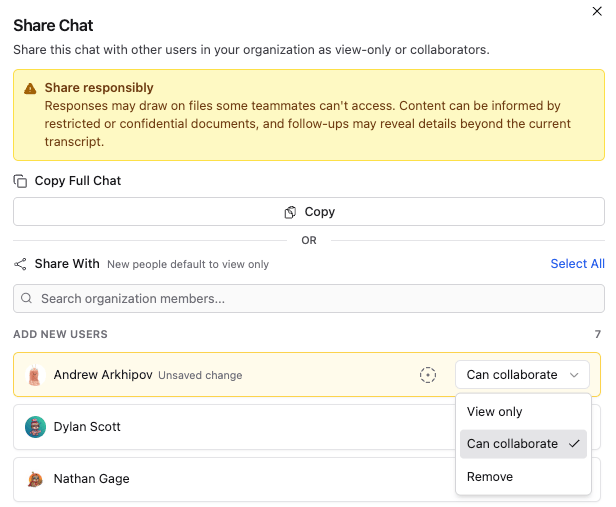 Share responsibly: responses may draw on files some teammates can't access, and follow-up questions may reveal details beyond the current transcript.
## Reuse what works
Save your best instructions as [Playbooks](/ai/playbooks) and apply them in any chat with one click.
Answer quality depends on what's in your [Organization Library](/library/organization-library). Fit and gap analysis in particular relies on your uploaded past performance and capability documents.
Share responsibly: responses may draw on files some teammates can't access, and follow-up questions may reveal details beyond the current transcript.
## Reuse what works
Save your best instructions as [Playbooks](/ai/playbooks) and apply them in any chat with one click.
Answer quality depends on what's in your [Organization Library](/library/organization-library). Fit and gap analysis in particular relies on your uploaded past performance and capability documents.